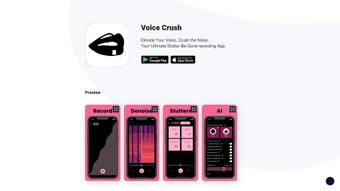

Download Voice Crush – AI Voice Enhancement, Noise Reduction, Anti‑Stutter Tool
Overview of Voice Crush
Voice Crush is a web‑based AI voice generator that specializes in polishing spoken recordings. Whether you’re a language learner practicing pronunciation, a podcaster striving for studio‑grade clarity, or simply someone who wants to send a crystal‑clear voice message, Voice Crush removes unwanted background noise and smooths out stuttering in real time. The platform leverages advanced denoising algorithms that can differentiate a speaker’s voice from ambient sounds, allowing it to suppress hum, traffic, café chatter, or any other disruptive audio without sacrificing the natural timbre of the voice.
In addition to noise reduction, the tool features an anti‑stutter engine that detects repeated syllables, filler words, and awkward pauses, then automatically edits them out to produce a fluid, confident delivery. Because Voice Crush runs entirely in the browser, there’s no need for bulky installations or costly licenses – just open the site, upload or record your audio, and let the AI do the heavy lifting. The intuitive interface makes it accessible to users of all skill levels, and the free tier provides generous processing minutes each month, making high‑quality voice enhancement truly affordable.
With a focus on security and privacy, all recordings are encrypted during upload and are deleted from the server after processing, ensuring that your personal or professional content stays private.
Key Features and Benefits
- AI‑Powered Noise Reduction: Eliminates background hiss, wind, traffic, and other environmental sounds while preserving vocal clarity.
- Anti‑Stutter Engine: Detects repeated words, filler sounds (“um”, “uh”) and awkward pauses, then automatically smooths the speech flow.
- One‑Click Web Interface: No downloads required; works on any modern browser across Windows, macOS, Linux, Android, and iOS.
- Real‑Time Preview: Listen to a before‑and‑after comparison instantly, allowing fine‑tuning of the denoise level.
- Language‑Learner Friendly: Helps learners focus on pronunciation by removing distractions, making self‑assessment more effective.
- Secure Processing: All audio files are encrypted in transit and automatically deleted after enhancement, protecting user privacy.
- Batch Processing (Pro Version): Upload multiple files at once and apply consistent enhancements across an entire project.
- Export Options: Save the cleaned audio in MP3, WAV, or OGG formats, ready for publishing or personal use.
- Free Tier with Generous Limits: Users receive 60 minutes of processing per month without a credit card.
- Regular Updates: The AI models are continuously trained on new datasets, ensuring improved performance over time.
Installation, Usage & Compatibility
Getting started with Voice Crush is remarkably straightforward. Because the tool is hosted in the cloud, there is no traditional installation process. Follow these steps to begin enhancing your recordings:
- Open Your Browser: Launch any recent version of Chrome, Firefox, Edge, Safari, or Opera.
- Visit the Official Site: Navigate to voicecrush.example.com. The homepage greets you with a clean dashboard and a “Start Enhancing” button.
- Create a Free Account (Optional): While you can process a single file without an account, registering gives you access to the free monthly quota, batch processing, and history tracking.
- Upload or Record: Click “Upload” to select a pre‑recorded file from your device, or choose “Record” to capture audio directly through your microphone.
- Choose Enhancement Settings: Adjust the noise reduction strength (Low, Medium, High) and toggle the anti‑stutter feature. For most users, the default “Medium” setting strikes a good balance.
- Process and Preview: Hit “Enhance”. Within seconds, the AI returns a cleaned version. Use the side‑by‑side player to compare the original and enhanced tracks.
- Download: Click “Download” and select your preferred format. The file is saved locally, ready for sharing or publishing.
Compatibility: Since Voice Crush runs in the browser, it is compatible with Windows 10/11, macOS Ventura and later, most Linux distributions, Chrome OS, as well as mobile browsers on Android 8+ and iOS 13+. No additional plugins or extensions are required, making it a versatile solution for both desktop and on‑the‑go users.
Pros, Cons, Frequently Asked Questions & Final Verdict
Pros
- Completely web‑based – no bulky downloads or installations.
- Powerful AI that removes background noise while preserving natural voice tone.
- Anti‑stutter feature is unique and especially useful for language learners.
- Free tier provides ample processing minutes for casual users.
- Secure, encrypted handling of audio files ensures privacy.
- Supports multiple export formats (MP3, WAV, OGG).
- Regular algorithm updates improve performance over time.
Cons
- Advanced batch processing and higher minute limits require a paid subscription.
- Processing speed depends on internet connection and server load.
- Limited offline functionality – a stable internet connection is mandatory.
- Customization of denoise parameters is less granular than some desktop DAWs.
- Audio file size limit on the free tier may restrict very long recordings.
Frequently Asked Questions
Is Voice Crush really free to use?
Yes. Voice Crush offers a free tier that includes 60 minutes of audio processing per month. No credit card is required, and the core noise‑reduction and anti‑stutter features are fully functional.
Can I use Voice Crush on my smartphone?
Absolutely. The platform works on modern mobile browsers for both Android and iOS. Simply open the site, grant microphone access, and you can record or upload audio directly from your phone.
How does the anti‑stutter engine work?
The engine uses a combination of speech‑recognition models and temporal analysis to detect repeated syllables, filler words, and unnatural pauses. Once identified, it intelligently splices the surrounding audio to create a smooth, natural flow without sounding robotic.
Is my audio data stored after processing?
No. All files are encrypted during upload, processed in memory, and automatically deleted from the server within five minutes after the user downloads the enhanced version.
Do I need a powerful computer to use Voice Crush?
No. Because the heavy AI computation happens on Voice Crush’s cloud servers, even modest devices can run the tool smoothly. The only requirement is a stable internet connection.
Final Verdict & Call to Action
Voice Crush stands out as a lightweight yet powerful solution for anyone who needs clear, professional‑grade audio without the hassle of traditional audio‑editing software. Its combination of AI‑driven noise suppression and an innovative anti‑stutter mechanism makes it especially valuable for language learners, podcasters, and remote workers who often record in less‑than‑ideal environments. While the free tier covers most casual use‑cases, power users may appreciate the optional subscription that unlocks batch processing and higher minute limits. Overall, Voice Crush delivers on its promise of “crushing” unwanted sounds while preserving the speaker’s natural voice—making it a must‑try tool for anyone serious about audio quality.
Ready to experience crystal‑clear recordings? Download Voice Crush now and start enhancing your voice for free!
Voice Crush delivers a smooth, noise‑free recording experience with an intuitive web interface. The anti‑stutter feature is a standout for language learners, and the generous free tier makes it accessible to hobbyists and professionals alike. Its cloud‑based architecture ensures fast processing without demanding hardware, though power users may eventually opt for the paid plan for batch capabilities.



.png)



